Technical SEO guide
Which Ecommerce Technical SEO Issues Actually Matter (and Which Are Noise)
Not every flag in your audit is worth fixing. Here are the ecommerce technical SEO issues that actually suppress revenue, sorted in priority order.

The audit came back with 200 flags. The team worked top to bottom for six months. Rankings did not move. The list was never the problem. Treating every item as equal was.
Some failures suppress every page on the site at once. Others touch a handful of pages and barely register in revenue. Telling them apart is the whole game. This note sorts the common ecommerce technical SEO issues into the order that actually matters, and explains why the order is the point.
Why audit tools rank technical SEO issues wrong
A crawl tool does not know which of your pages make money. Screaming Frog, Semrush and Ahrefs are excellent at finding problems and poor at ranking them by impact. A missing alt tag on a blog image and a canonical failure across eight thousand product pages can land under the same red flag.
One is noise. The other is suppressing your catalogue. The fix is not a longer list, it is a way to triage the list, the judgment that real ecommerce technical SEO is built on. That starts with knowing which layer an issue sits in.
The three layers of technical SEO issues, worst first
Every technical issue on an ecommerce site lands in one of three layers, and the layers are not equal in cost.
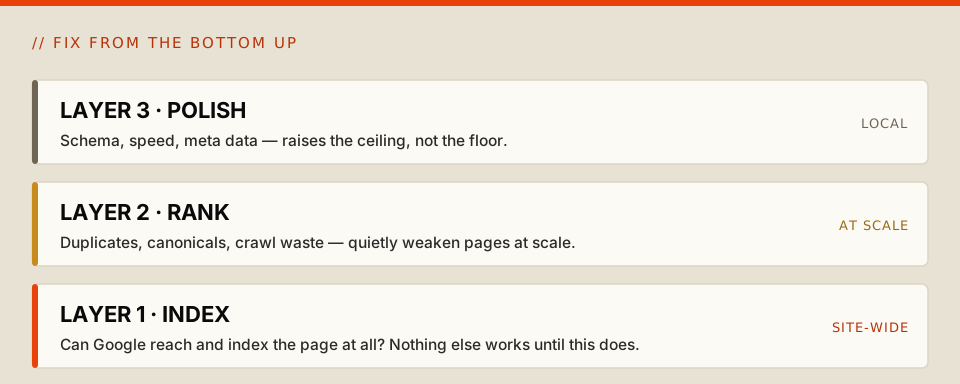
- Layer 1, can Google reach and index the page at all. If a category page is blocked, looping through redirects, or missing from the sitemap, nothing downstream matters.
- Layer 2, can Google rank the page properly once indexed. Duplicate URLs, canonical conflicts and crawl waste do not hide a page; they make it weaker than it should be, usually at scale.
- Layer 3, is the page polished. Schema, meta descriptions, alt tags, individual page speed. Real work, local impact.
Most tools flag all three at the same severity. They are not the same. Fixing Layer 3 while Layer 1 is broken is polishing pages Google cannot find, which is why the sensible order runs from the bottom up.
Layer 1: when Google cannot find or index your pages
These come first because nothing else works until they are fixed.
Indexation gaps on pages that matter
The symptom: your best category and product pages are not in Google's index, or far fewer pages are indexed than you have. The cause is usually a stray no-index left over from staging, a robots.txt rule blocking a folder, or pages buried too deep to be crawled. Check coverage in Search Console, not just your crawl tool: a crawl tool shows what could be crawled, Search Console shows what Google actually indexed, and the gap between them is where the money leaks.
A misconfigured robots.txt or XML sitemap
The symptom: important pages are not being crawled, or junk pages are. A single overly broad disallow can wall off a whole section, and a stale sitemap full of out-of-stock and redirected URLs sends Google to the wrong places. Read the robots.txt line by line. Keep the sitemap to live, indexable, canonical URLs only, and on large catalogues split it into an index file so you can see which sections are covered.
Layer 2: when Google indexes but cannot rank you properly
This is where most stores quietly bleed, because these issues hit pages at scale.
Index bloat from faceted navigation
The most common and most damaging issue on large ecommerce sites. Filters are good for shoppers, but each combination usually spins up its own URL, and a store with a few hundred products can generate tens of thousands of crawlable URLs once you multiply categories by filters by variants. Google burns crawl budget on near-identical filter pages, ranking signals scatter across duplicates, and your real pages get crawled less often. Decide which filter pages have genuine search demand and keep those; apply no-index or canonical rules to the rest, and disallow the worst offenders in robots.txt. You will watch the indexed-page count fall in Search Console over the following weeks. This is the single fix most worth getting right, and it overlaps directly with whether AI systems can read your store.
Duplicate content and canonical conflicts
The symptom: the same product sits on more than one URL and Google sometimes ranks the version you did not want. Shopify is the clearest case, where a product reached through a collection gets a /collections/.../products/ URL alongside the clean /products/ one. A canonical tag points at the clean version by default, but a canonical tag is a hint, not an instruction, and Google can override it. Do not rely on the tag alone. Point your internal links and sitemap at the same canonical URL so every signal agrees; when the signals conflict, Google picks for you, and it often picks the weaker page.
Crawl budget wasted on the wrong pages
The symptom: new products take ages to appear and updates are slow to register. Google gives each large site a finite crawl budget, and redirect chains, soft 404s, session-token URLs and indexed internal search results soak it up. Internal search pages are a quiet culprit, since they can generate an effectively infinite set of low-value URLs. Nonindex or disallow internal search results, fix redirect chains, and use internal linking to push authority toward category and product pages. Server log analysis tells you exactly where the budget is going; a crawl tool only guesses.
JavaScript that hides your content
The symptom: category pages rank weaker than your product quality deserves. If pricing, availability or the description only appear after client-side JavaScript runs, Google may index an empty frame. It renders JavaScript, but not instantly and not always; its own guidance confirms pages can sit in a rendering queue, and pages serving the wrong status code can be skipped. Check that key content is present in the raw HTML rather than injected later, and on important templates, server-side rendering removes the risk. The same gap decides whether non-rendering AI crawlers can see your pages at all.
Layer 3: worth doing, but not first
These improve the pages that can already rank. They raise the ceiling, not the floor, so do them after Layers 1 and 2 are clean.
Structured data. Product, review and breadcrumb schema in JSON-LD feed rich results and, increasingly, AI answers. Validate it. It will not rescue a page Google cannot index, but on healthy pages it lifts click-through.
Out-of-stock and discontinued pages. Left unmanaged, an out-of-stock page can read as a soft 404 and get dropped. Keep temporarily unavailable products live with clear availability messaging; for permanently discontinued ones, 301 high-value pages to the closest relevant alternative and let genuinely worthless ones return a clean 404.
Page speed, mobile and meta data. Core Web Vitals, mobile rendering and unique meta descriptions matter for experience and click-through, but they are the most over-prioritised issues in ecommerce because they are the easiest to measure. Measurable is not the same as important. Fix them once the structural layer holds.
How to triage your technical SEO issues audit
The goal is not to clear the list. It is to fix things in the order that lets the rest of your work compound.
Start at Layer 1: confirm your money pages are crawled, indexed and returning a 200, using Search Console and, on large sites, server logs. Move to Layer 2: bring faceted navigation under control, resolve canonical conflicts, stop crawl waste, and check nothing important depends on JavaScript, because these affect many pages at once. Finish with Layer 3: schema, out-of-stock handling, speed and meta data, as polish rather than rescue. When the damage is already done and a regression has taken rankings down, the same triage runs against the clock as traffic recovery for ecommerce.
A crawl report is a list of symptoms. Triage is the part the tool cannot do, because it needs to know which pages earn revenue and which issues are site-wide rather than local. That is exactly the judgement an SEO audit exists to supply.
The bottom line
A technical SEO audit is not a to-do list to be cleared in order. It is a map of where your search system is breaking, and the breaks are not equal in cost. Some suppress every page you own; some affect one page for a few weeks. A team that treats the report as a flat backlog spends months on the cheap problems while the expensive ones compound underneath.
The same foundations now decide more than your Google rankings. They decide whether AI search engines can read, trust and cite your pages at all. The stores that recover fastest fix the structural layer first, then polish. Order is what makes the work pay.
FAQs
What is the most important technical SEO issue for ecommerce?
Crawling and indexation. If search engines cannot reach and index your key pages, nothing else matters. On large catalogues, faceted-navigation index bloat is usually the highest-impact structural issue to tackle first.
How do I know if faceted navigation is hurting my SEO?
Compare your indexed page count in Search Console against your actual product and category count. If a few hundred products produce tens of thousands of indexed pages, filter URLs are draining crawl budget and diluting rankings.
Do canonical tags fully fix duplicate content?
Not reliably. A canonical tag is a hint Google can ignore. The durable fix is consistency: point internal links and your XML sitemap at the same canonical URL so every signal agrees on which version should rank.
Should I delete out-of-stock product pages?
Usually no. Keep temporarily unavailable products live with clear availability messaging. Only redirect or remove permanently discontinued products, sending high-value pages to a close alternative and letting worthless ones return a clean 404.
How often should I run a technical SEO audit?
Audit fully each quarter and monitor Search Console crawl and indexation reports continuously. Large catalogues change constantly, and most new technical issues arrive during deployments, migrations and seasonal updates.