Content Strategy · Pillar
How to Develop a Blog Content Strategy for Ecommerce SEO
An ecommerce content strategy only grows sales when content connects to the pages that sell. How to build one, and which content types actually earn revenue.
An ecommerce content strategy decides what you publish and, more importantly, how that content connects to the pages that make money. Most brands get the first part right and ignore the second.
They publish steadily, traffic climbs, and revenue stays flat. The fix is structural before it is editorial. This guide covers what a content strategy for ecommerce SEO really involves, why most fail to grow sales, how to build one step by step, and which content types are actually worth your time.
What an ecommerce content strategy is
An ecommerce content strategy is a plan for creating, organising and connecting content so it attracts the right buyers and guides them toward your products. It covers what you publish, who it targets, and how each piece links to your category and product pages.
The difference between a strategy that works and one that does not come down to that last part: connection. A post that ranks but links to nothing commercial brings visitors who read and leave. A post wired into the pages that sell turns attention into revenue. A complete strategy usually starts from ecommerce keyword research tied to what buyers actually search, a plan mapped to each stage of the buyer journey, topic clusters built around your main categories, internal links that route readers and authority to commercial pages, and a way to measure revenue rather than just traffic.
Why most ecommerce content fails to grow sales
It fails for one reason: it is not connected to the pages that sell. The writing is usually fine. The structure underneath it is not. Three problems show up again and again.
The content links to nothing
A blog post with no link to a category or product page is an orphan in commercial terms. Readers arrive from search, read, and leave with nowhere to go, and the post passes no authority to the pages you actually want to rank.
The blog competes with the category pages
When a post and a category page target the same buying term, Google has to pick one, and it often picks the post, so you rank with a page that has no add-to-basket button. Google does not always treat this as a ranking problem, but the lost sales are real either way. Sorting it out is partly an intent mapping job: line each page up with the buying moment it actually serves.
The content never compounds
A good strategy compounds. Each post should strengthen a cluster, the cluster should strengthen the category page at its centre, and that page should climb. Without internal links between them you get a pile of disconnected posts instead of a cluster that builds authority. The same gap hurts you in AI search, where engines read a connected cluster as real expertise on a topic and are far more likely to cite it than scattered posts. That shift is the subject of generative engine optimisation.
How to build one, step by step
Tie every piece of content to a buyer intent and a commercial destination, build clusters around your categories, and connect them with internal links. The process we use runs in five steps.
Step 1: Research intent, then map each topic to a page
Start with keyword research, but go one step further than most teams. This is where intent mapping for ecommerce earns its place: for every topic, decide which category or product page it supports. If a topic has no commercial destination, question whether it earns a place on the calendar. That one rule prevents most orphaned content before you ever write it.
Step 2: Build topic clusters around your categories
Group related posts around a central page that targets your main category term. The category page is the hub. Your posts are the spokes. This signals topical authority to search engines and keeps the content focused on the terms you want to own.
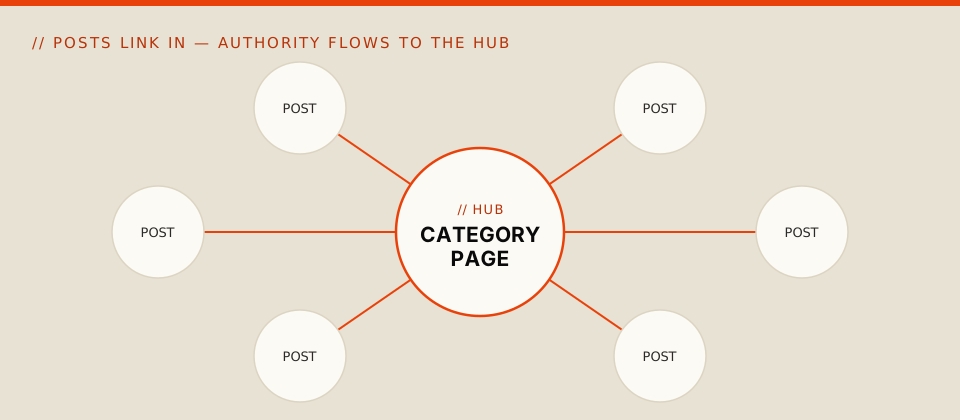
Step 3: Connect everything with internal links
The step most brands skip, and the one that matters most. Link every supporting post up to its category page with clear anchor text that names the destination, not click here, then link related posts to each other so nothing sits alone. A quick test: open any post and ask which product or category page it sends the reader to. If the answer is none, that post is leaking.
Step 4: Fix existing content before publishing more
Before adding posts, run a content audit on what you already have. Find the orphans, the cannibalised terms and the clusters with no hub. Reconnecting and improving existing content is faster than writing more, and it works on pages you have already paid for. Semrush, Ahrefs and Screaming Frog make this quick to find at scale, and most of the fixes sit alongside the wider technical SEO issues that hold ecommerce sites back.
Step 5: Measure revenue, not just traffic
Blog sessions tell you almost nothing about money. Track assisted conversions, movement in your category-page rankings, and how often readers click from content through to a commercial page. Those numbers tell you whether the strategy is working. Sessions on their own do not.
Which content types actually earn revenue
The best ecommerce content matches a buyer's stage and connects to a commercial page. You do not need every format, just the few that move people toward a purchase.
- Buying guides and comparisons, which catch buyers in research mode and link straight to the products they are weighing up.
- How-to and educational posts, which build trust and answer the questions buyers have before they are ready to purchase.
- Product-focused content: strong descriptions, FAQs and reviews on the pages that sell.
- Video, where demos and how-to clips keep people engaged and can rank on their own.
The bottom line
A blog content strategy for ecommerce is an architecture decision before it is a publishing one. Content that connects to your commercial pages compounds. Content that connects to nothing brings traffic that leaves.
So before you plan the next month of posts, look at how your existing content connects to the pages that sell. That structure, not the publishing calendar, is what moves revenue. Get it right and every post you add makes the next one work harder. Skip it and you are paying to fill a schedule.
FAQs
How long does an ecommerce content strategy take to show results?
Usually three to six months, depending on the site's current state and competition. Reconnecting and improving existing content often moves faster than publishing brand-new posts.
How often should we publish?
Consistency beats volume. A few well-connected posts a month that each support a category page will outperform a high-output blog where nothing links to anything commercial.
Should we build product pages or blog content first?
Product and category pages first, because they are what content needs to point to. Build the commercial pages, then create content that supports and links to them.
Do we still need a blog if we sell mainly on marketplaces?
Yes. Your own content builds search visibility you do not rent from a marketplace, and it reaches buyers earlier in their research than a product listing can.
Can AI tools write our ecommerce content?
They speed up drafts and outlines, but strategy, structure and real experience still need a human. The link between content and commercial pages is a planning decision, and that is where the value sits.