SERP stands for search engine results page: the webpage that search engines like Google or Bing show after you type a query. A SERP lists organic results, ads and extra features such as AI Overviews, maps and product listings, ranked for that specific search.
In finance, SERP also means Supplemental Executive Retirement Plan, a benefit for senior executives. This guide covers the search meaning. You will see what a SERP shows in 2026, why it changes by query, and how to read it before you build a page.
What does SERP stand for in SEO?
The meaning of SERP in SEO is simple: the search engine results page. Each SERP is built for 1 search query, so 2 related keywords can return very different pages. When people talk about SERP positions or rankings, they mean where a web page appears in the organic search results on that page.
The SERP is where search engine optimization gets judged. Every title tag, meta description, heading and internal link you change aims to help you rank higher, then earn a click. That is the core of our on-page SEO services: matching each page to what the SERP for its keyword rewards.
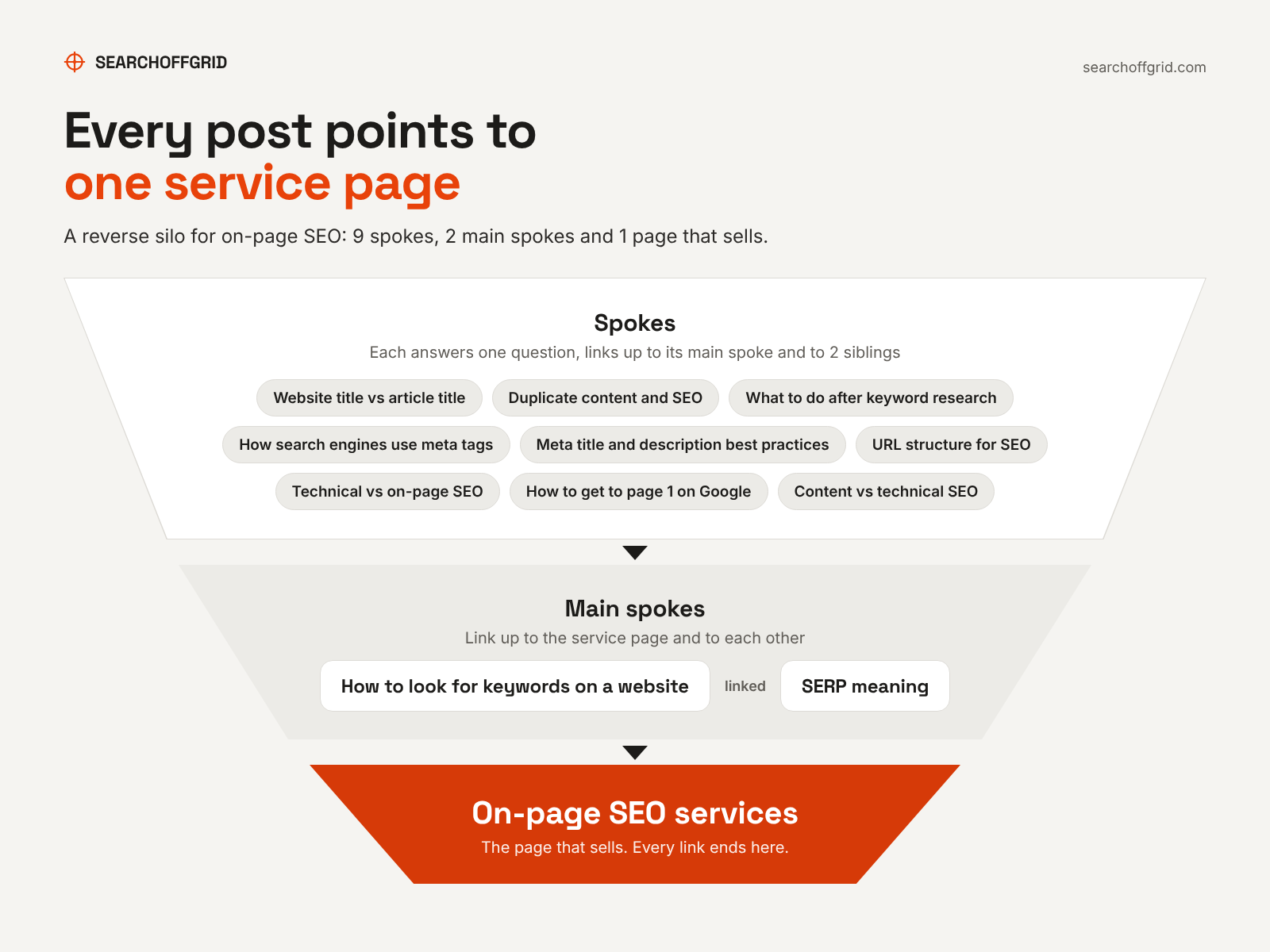
This guide sits at the center of a set of on-page SEO guides, and every one of them links back up to that service page.
For years a SERP meant 10 blue links. In 2026 a single results page can show an AI-generated answer, ads, a map and a product carousel. All of that can sit above the first organic listing.
Anatomy of a SERP: what appears on the page in 2026
A SERP in 2026 mixes 3 types of result: organic results, paid search results and SERP features. Organic results are ranked by the search engine's algorithm and cannot be bought. Paid results are ads, and they usually appear at the top and bottom of the page. SERP features are the special formats Google adds when they help the user's query.
| SERP element | What it is | How a page gets there |
|---|---|---|
| Organic results | Standard listings with a title link, URL and snippet | Relevance, quality and authority for the query |
| Paid search ads | Ads labeled as sponsored, at the top or bottom of the SERP | Google Ads bidding |
| AI Overviews | AI-generated summary with links to supporting pages | Indexed, snippet-eligible pages that answer part of the query |
| AI Mode | A separate conversational search experience with its own links | Same eligibility as AI Overviews |
| Featured snippet | The answer shown first, then the source link | Chosen by Google's systems; no markup or structured data can force it |
| People Also Ask | Expandable related questions, each with a snippet | Clear, direct answers to common questions |
| Local pack | Map with nearby businesses | Google Business Profile relevance, distance and prominence |
| Shopping results | Product listings with price and image, paid and free | Product data and Google Ads Shopping campaigns |
| Images and videos | Thumbnails for visual or video queries | Indexed images and videos on relevant pages |
| Knowledge panel | Information box about a person, place or organization | Automatically generated from the Knowledge Graph |
Google documents the parts of a standard result, such as the title link, snippet and sitelinks, in its visual elements gallery. Google's systems pick featured snippets. Asked how to mark a page as a featured snippet, Google answers "You can't," per its featured snippets guide. Knowledge panels are "automatically generated," per Google's knowledge panel help page. Local results are "mainly based on relevance, distance, and popularity." Google also says you cannot pay for a better local ranking, per its local ranking help page.
How AI Overviews and AI Mode change the SERP
AI Overviews sit at the top of the SERP for many informational searches and answer the query before any organic listing. Google says AI Overviews and AI Mode may use "query fan-out," running several related searches across subtopics, and then link to supporting pages. Google states there are no extra requirements or special schema to appear. A page must be indexed and eligible to show with a snippet, per its AI features documentation. AI Overviews only show when Google judges them useful, so many SERPs have none.
Mentions across the web can matter as much as the page itself. A PR campaign for an Australian business got the brand mentioned across the web. Within weeks, the business was cited in AI Overviews, and nothing on its website had changed. The same pattern applies to AI assistants such as ChatGPT search. Being retrieved, cited, mentioned or recommended by AI search are separate outcomes, and none guarantees the next.
Why SERPs differ by query and search intent
SERPs differ because Google builds each SERP for the intent behind the query. A search for a repair shop returns a local pack. A search for a product style returns images and shopping results. A "what is" search returns a featured snippet or an AI Overview. Google explains that the features shown change with the query in its guide to how Google Search works.
The same query can also return a different SERP for different people. Google names the user's location, language and device as factors in relevance. Search history and settings can shift results too. A search from a phone in Chicago and a desktop search in London can show different local results and different ads.
"SERP" itself shows how intent shapes the page. When we checked the US results for "serp meaning" on October 20, 2026, 3 of the top 9 organic listings explained the retirement plan. Some searchers mean the finance term, so Google mixes both. The AI Overview covered both meanings for the same reason.
How to read a SERP before you build a page
Read the SERP before you write anything, because it tells you which page type Google already rewards. Search your target keyword in a private window. Then note 3 things about the top 10 organic results:
- Page type. Note whether the results are category pages, single products, service pages, guides or listicles. Build the type that dominates.
- SERP features. An AI Overview or featured snippet means you need a short, direct answer near the top of the page. A local pack means your Google Business Profile matters as much as the page.
- Depth and angle. Note what every top result covers and what none of them cover. The gap is your edge.
The SERP also tells you how many pages to build. We cluster keywords by SERP overlap. If 2 keywords share 3 or more URLs in their top 10, we treat them as 1 topic for 1 page. If they share fewer, we test them as separate pages. Running that check before writing stops 2 of your own pages competing for the same SERP.
The check can surprise you. On October 20, 2026, "serp meaning" and "what does serp stand for" shared 0 organic URLs in their US top 10. Google still showed the same AI Overview for both. Finance pages took different slots on each SERP and pushed the SEO glossaries around. For 2 definition queries with the same answer, we still cover both on 1 page and answer the second in the first sentence. For commercial keywords, a split like that is a signal to build 2 pages.
To find the keywords to cluster in the first place, our guide on how to look for keywords on a website walks through the sources.
Once you know the page type, decide whether the page needs content work or a technical fix first. Our comparison of technical SEO vs on-page SEO maps symptoms to the right starting point.
After the change ships, measure it properly. Our guide to content SEO vs technical SEO shows how to verify each type of fix before you judge the result.
How to track SERP positions and features
Track SERP positions with Google Search Console first, then add a rank tracker for features. Search Console's Performance report shows clicks, impressions, click-through rate and average position for each query and page. In the table, average position is the average spot in search results for that URL or query, per Google's Performance report help page. Clicks from AI Overviews and AI Mode count toward the Web search type in the same report.
Average position hides SERP features. Pair it with a rank tracker that records which features show for each keyword and whether you hold them. A page at position 3 below an AI Overview, 4 ads and a local pack can sit far down the screen. Watch 3 numbers together: position, SERP features present, and click-through rate. If impressions rise while clicks stay flat, the SERP layout probably changed above you. Good user experience on your page cannot win back a click that a new feature took.
Queries where you sit between positions 11 and 20 deserve the closest watch. Our guide on how to get to page 1 on Google covers what to change on those pages.
Put the SERP to work for your pages
Pick your most important keyword, read its SERP, and check whether your page matches the type and features Google shows. If you want help matching every key page to its SERP, see our on-page SEO services.